Zorge → Posts → Connecting the bot
How to connect a bot to Telegram Business
It takes a minute and you do it once. There is a section in your own profile settings where you type the bot's name and tick the chats it works in. Telegram Premium is not needed — that section has been open to everyone since May 2026.
The steps are below, with pictures, and so is the part nobody writes about: what to do when the section is not there.
All three steps at once
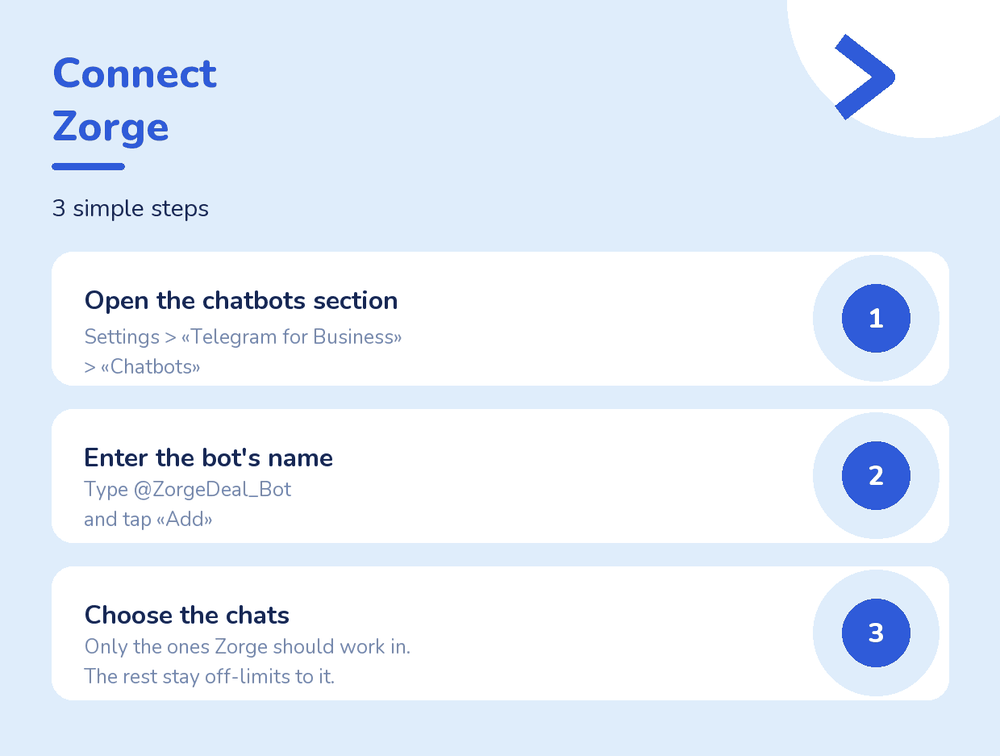
Step 1. Find the section in settings
Open your profile and tap “Edit”. The entry sits at the very bottom of the list, below “Channel”.
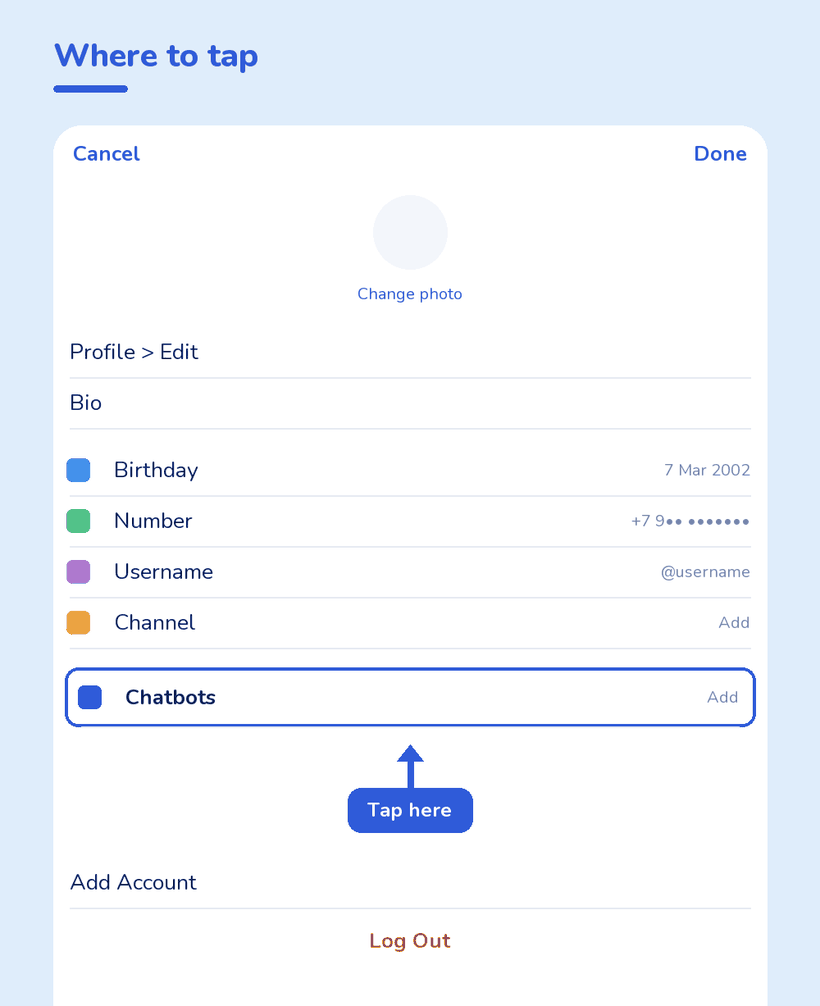
It goes by more than one name. Some versions call it “Chatbots”, others “Chat automation”, and on some the path runs through “Telegram for Business”. It is the same section — Telegram renamed it along the way. Look for the place rather than the label: the bottom of the profile editing screen.
Step 2. Enter the bot's name
Inside the section there is a field for a bot name. Type @ZorgeDeal_Bot and confirm. No password and no SMS code is asked for at any point — if something asks for one, it is not Telegram.
Step 3. Tick the chats
The last step is the chat list. Telegram offers “all private chats” by default, but the choice is yours: one chat, several, or everything except a few.
Whatever is not ticked stays out of reach entirely — the bot receives neither messages nor deletion notices from there. The list can be changed later on the same screen.
When the section is missing
Almost always it is the app. In order of likelihood:
| What you see | What to do |
|---|---|
| The entry is simply not in profile settings | Update Telegram. The section arrived in the 2024 releases and an older build will not have it. |
| Setting it up on a computer, nothing there | Some desktop versions do not have the section at all. Connect from the phone app — after that it works on every device, computer included. |
| It says Premium is required | That was true until May 2026. The limit is gone; an app still saying it is out of date. |
| The section is there but the bot will not add | Check the name: @ZorgeDeal_Bot, no spaces. Similar names belong to other bots. |
What happens afterwards
Nothing — that is rather the point. You do not open the bot daily; it writes to you when there is something to say.
- A message is deleted — its contents arrive: text, files, who deleted it.
- A message is edited — both versions arrive side by side, before and after.
- A promise with a deadline is made — the bot notices “I'll send it by Friday” and offers a reminder. This part can be switched off.
One limit runs through all of it: only what arrives after connecting is saved. Yesterday's conversation will not appear — no copy of it exists anywhere. This is not recovery, it is insurance for what comes next.
Common questions
Do I need Telegram Premium?
No. The Chatbots section has been open to all users since May 2026. All you need is a recent enough version of the app.
Why can't I find “Chatbots”?
Your version most likely calls it “Chat automation”, or hides it behind “Telegram for Business”. It is the same section — look at the bottom of the profile editing screen rather than at the name.
Can I connect from a computer?
Some desktop versions do not have the section. Opening the settings in the phone app is the reliable route; once connected, it applies on every device.
Will the other person know?
The bot connects to your account, not theirs, and the copies reach only you. They get no notification. The responsibility for keeping a conversation with another person is still yours.
How do I disconnect?
On the same Telegram settings screen: remove the bot from the section. New messages stop being saved immediately; what is already saved stays in the bot until you delete it.
Next
The Telegram bot that saves deleted messages — what it keeps, what it costs and where the limits are.
How to see deleted messages on Telegram — why deleted does not come back and what is sold as recovery.
Does Premium show deleted messages? — no, and where the idea comes from.